Drift
Per-sheet walkthrough — L1 Reconciliation Dashboard.
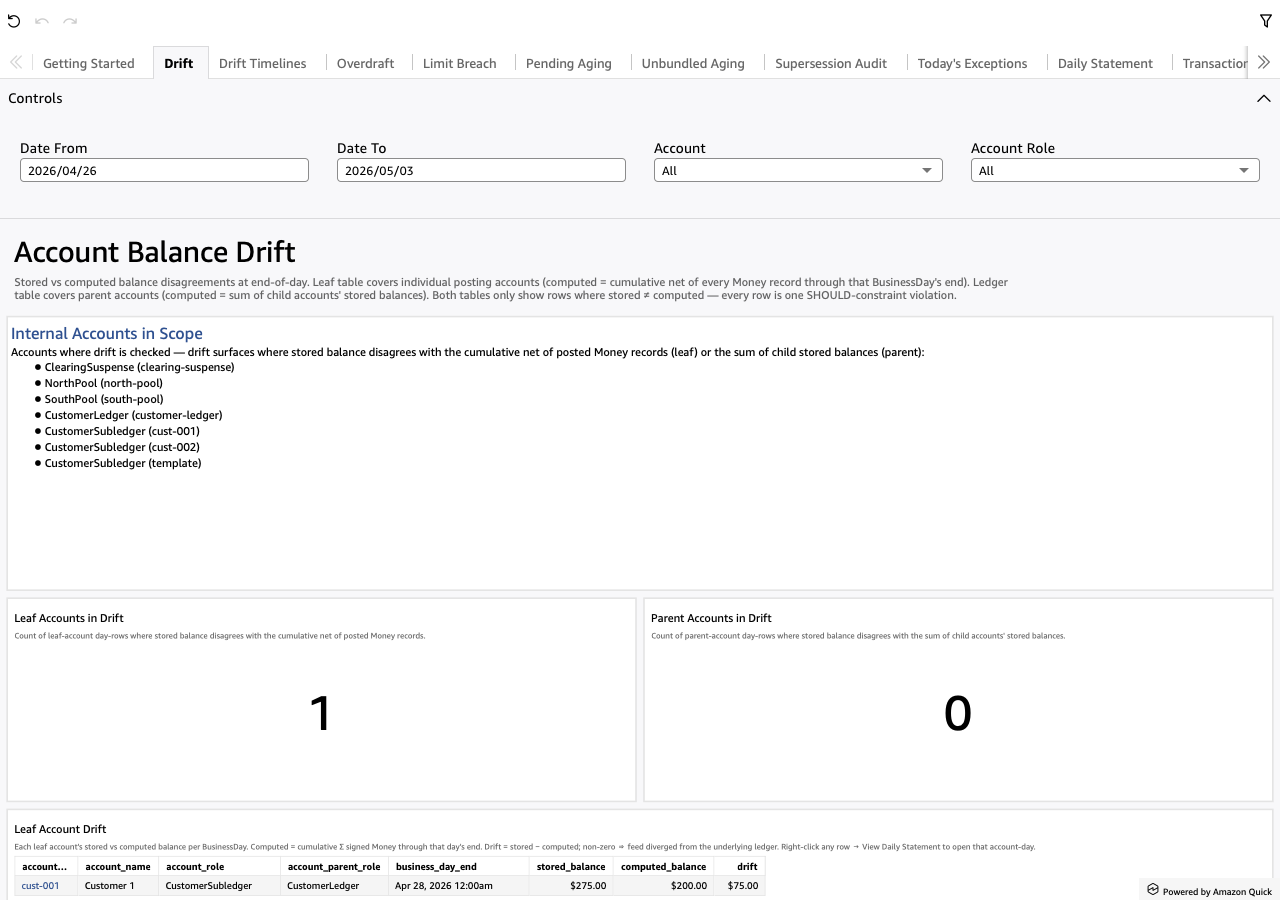
What the sheet shows
Stored vs computed balance disagreements at end-of-day. Two scopes:
- Leaf account drift — individual posting accounts whose stored balance disagrees with the cumulative net of every posted Money record through that BusinessDay.
- Parent account drift — parent accounts whose stored balance disagrees with the sum of their child accounts' stored balances.
Both tables only show rows where stored ≠ computed. Each row IS a SHOULD-constraint violation; healthy = empty.
Screenshot
When to use it
Daily. A non-zero count on either KPI means the feed diverged from the underlying ledger or a child posting didn't roll up correctly to its parent.
Visuals
- Internal Accounts in Scope — TextBox listing every internal account the L2 instance declares + its role + L2-supplied prose. Sets the universe drift can surface against.
- Leaf Accounts in Drift (KPI) + Parent Accounts in Drift (KPI) — count of distinct (account, day) violations per scope.
- Leaf Account Drift (Table) — one row per (leaf account, day)
cell where stored ≠ computed. Carries
account_id,account_name,account_role,account_parent_role,business_day_end,stored_balance,computed_balance,drift. - Parent Account Drift (Table) — same shape minus
account_parent_role(parents ARE the parents).
Drills
- Right-click any row → "View Daily Statement for this account-day"
— opens Daily Statement filtered to the clicked
(account_id,
  business_day_end)
for the per-leg walk.
Filters
- Date From / Date To — universal date-range pickers, default last 7 days.
- Account — multi-select dropdown over
account_id. - Account Role — multi-select dropdown over
account_role. Both filters apply to both tables (ALL_DATASETSscope).