L1 Reconciliation Dashboard
Generic SHOULD-constraint visualization for any L2-modeled institution. Currently rendered against Your Institution (spec_example).
The L1 Reconciliation Dashboard visualizes every L1 SHOULD-constraint declared by the SPEC against the data of one L2 instance — descriptions, account universe, rail topology, posting requirements, limit caps, aging windows. It's the canonical L1 surface, configured by the L2 instance you point it at. Switch the L2 → switch the persona, prose, and scenario coverage without changing a line of dashboard code.
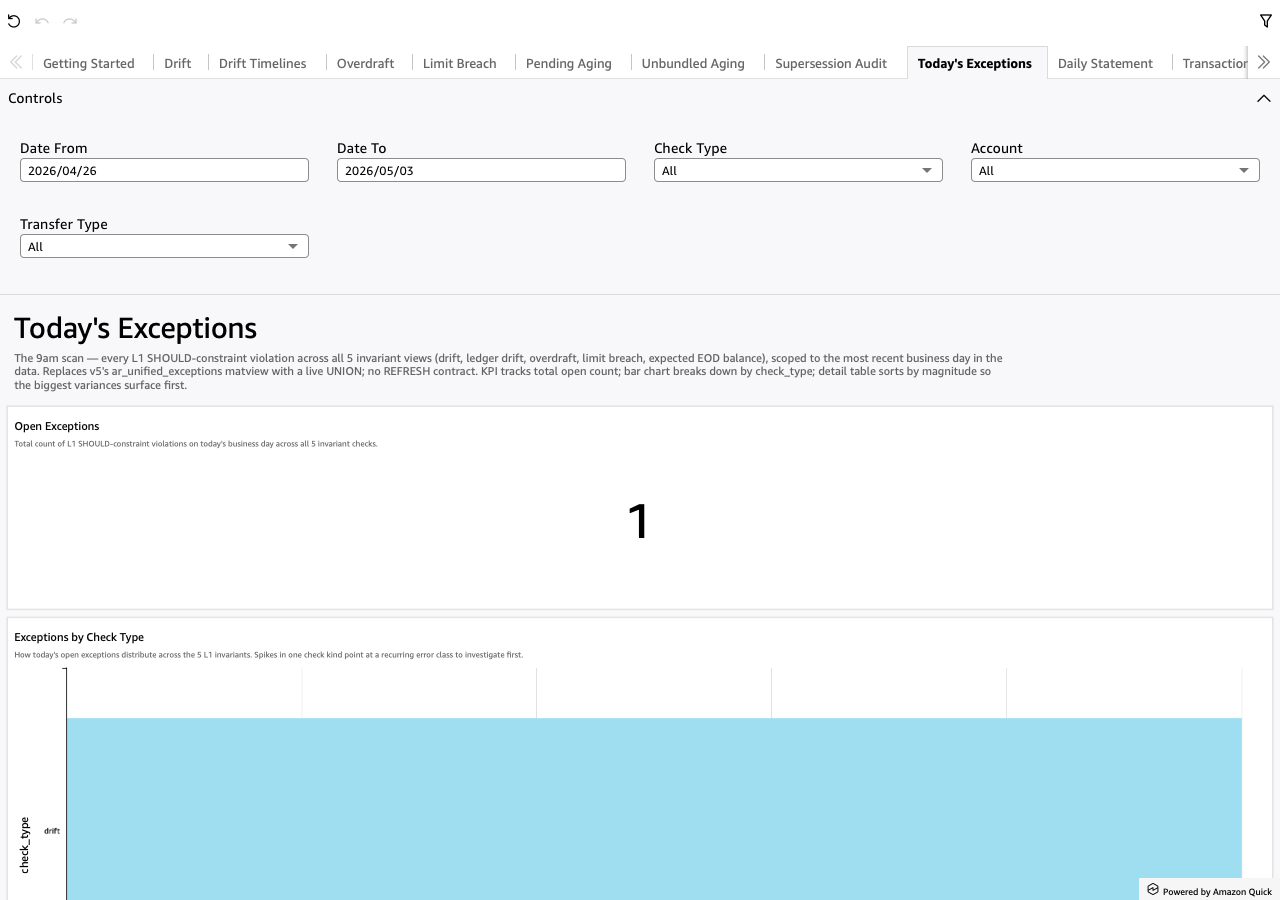
Screenshot
Account topology backing this render
What the L1 dashboard reconciles
Five L1 invariant views (always present) plus two aging-watch invariants (per-rail opt-in). Every row in any of these views IS a SHOULD-constraint violation; healthy = empty.
Drift
Stored balance disagrees with the cumulative net of posted Money records (leaf accounts) or with the sum of child stored balances (parent accounts).
Overdraft
An internal account ended the day with negative stored money. The L1 invariant: no internal account holds negative balance.
Limit Breach
Cumulative outbound debit on a (parent_role × transfer_type) cell exceeded the L2-configured cap for that day.
Expected EOD Balance
An account whose L2 declares an expected_eod_balance ended the day at a different amount. Surfaces in Today's Exceptions; see the L1 Invariants reference for the formal definition.
Stuck Pending
A transaction stayed in status='Pending' past its rail's max_pending_age cap. (Per-rail aging-watch — opt-in.)
Stuck Unbundled
A Posted leg with bundle_id IS NULL stayed unbundled past its rail's max_unbundled_age cap.
A separate Supersession Audit sheet surfaces logical keys with more
than one entry — the audit trail for TechnicalCorrection /
BundleAssignment / Inflight rewrites. Diagnostic, not a SHOULD
constraint.
The analyst journey
The dashboard is structured top-down for a 9am morning routine. Open Today's Exceptions first. The KPI answers "did anything break overnight?" The bar chart breaks today's count down by check_type so you see the error class shape immediately. The detail table sorts by violation magnitude, biggest first.
From there:
- Left-click an
account_idin any Today's Exceptions row → narrows the per-invariant sheets (Drift / Overdraft / Limit Breach) to that account so you can see its specific violations in context. - Right-click → "View Daily Statement" on any row → opens the per-account-day walk: opening balance, debits, credits, closing stored, drift KPI, plus the every-leg detail table.
- From any per-invariant detail row, right-click → "View Daily Statement" for the same drill-forward.
- From any Daily Statement leg, right-click → "View Transactions" for the raw posting ledger filtered to that transfer's legs.
That's the canonical drill chain: Today's Exceptions → per-invariant narrowing → Daily Statement → Transactions. Every sheet is also filterable independently — date range pickers (Date From / Date To, default 7 days), per-sheet category dropdowns (Account, Account Role, Transfer Type, Rail, Status, Origin), and parameter pickers on Daily Statement (Account + Business Day).
The L2-instance contract
Everything the dashboard knows about your institution comes from the L2 instance YAML. The instance declares:
- Accounts + their roles, scopes (internal / external), parents
- Account templates (role classes that materialize at runtime)
- Rails (the canonical patterns by which transfers get posted — one-leg, two-leg, aggregating; per-rail aging caps)
- Transfer templates (multi-leg shared transfers with closure rules)
- Chains (transfer-of-transfers ordered flows; XOR groups)
- LimitSchedules (per-(parent_role × transfer_type) daily caps)
- A
descriptionfield on every primitive
The schema emitter common.l2.emit_schema(instance) produces a
prefixed PostgreSQL DDL that creates the base tables + every L1
invariant view + every dashboard-shape matview. The dashboard reads
those spec_example_* views directly. The descriptions surface as
TextBox prose on each sheet — the "Configured Caps" block on Limit
Breach lists every L2 LimitSchedule with its cap and prose; the
"Internal Accounts in Scope" block on Drift lists every internal
account's role + L2-supplied prose; the Today's Exceptions footer
embeds the L2's top-level institution description.
Switching the L2 instance switches the prose. The same dashboard renders against any L2 — that's the M.2a "L1 dashboard configured by an L2 instance" promise.
Sheet inventory
11 sheets in display order. Click each name to jump to its walkthrough.
Getting Started
L2-derived welcome + coverage overview.
Drift
Leaf + parent account balance drift detail tables.
Drift Timelines
Σ |drift| per BusinessDay over time, line per role.
Overdraft
Internal accounts holding negative money at EOD.
Limit Breach
Per-(account, day, type) cells that exceeded the L2 cap.
Pending Aging
Pending transactions past their rail's max_pending_age.
Unbundled Aging
Posted legs with no bundle past max_unbundled_age.
Supersession Audit
Logical keys with multiple entries — the rewrite trail.
Today's Exceptions
UNION across all 5 invariants for today's business day.
Daily Statement
Per-(account, day) walk: opening + flow + closing + drift.
Transactions
Raw posting ledger; supersession-aware via the Current* matview.
Dataflow — which datasets feed which sheets
Cross-app integration
The L1 dashboard is intentionally L2-agnostic. Other dashboards that specialize the L1 surface (e.g., Investigation, Executives) can drill into L1 as a back-stop view: "any anomaly the specialized analysis flags can be checked against the institution's L1 invariants without leaving the same data plane." The shared prefix story (M.2d.3 follow-up) extends this — multiple dashboards rendering against one L2 instance's matviews, each highlighting a different question.
Generation + deployment
# Generate JSON for all four bundled apps to run/out/
quicksight-gen json apply -c run/config.yaml -o run/out

# Same emit, then deploy to AWS (delete-then-create)
quicksight-gen json apply -c run/config.yaml -o run/out --execute
The L2 instance defaults to the bundled spec_example fixture. To
target a different L2 instance, see the
customization handbook.